Sight Word Bingo Card Generator
Printable sight word bingo for reading practice: the Dolch lists from pre-primer to third grade, or your own words, every card different.
Recent
Your last 10 settings, saved only in this browser. Nothing is uploaded.
Sight word bingo is a bingo game where each square holds a common word that children learn to recognize at a glance. This free sight word bingo card generator runs in your web browser, with no sign-up, and makes printable cards that you can print or save as a PDF. The cards are made on your own device, and nothing is uploaded.
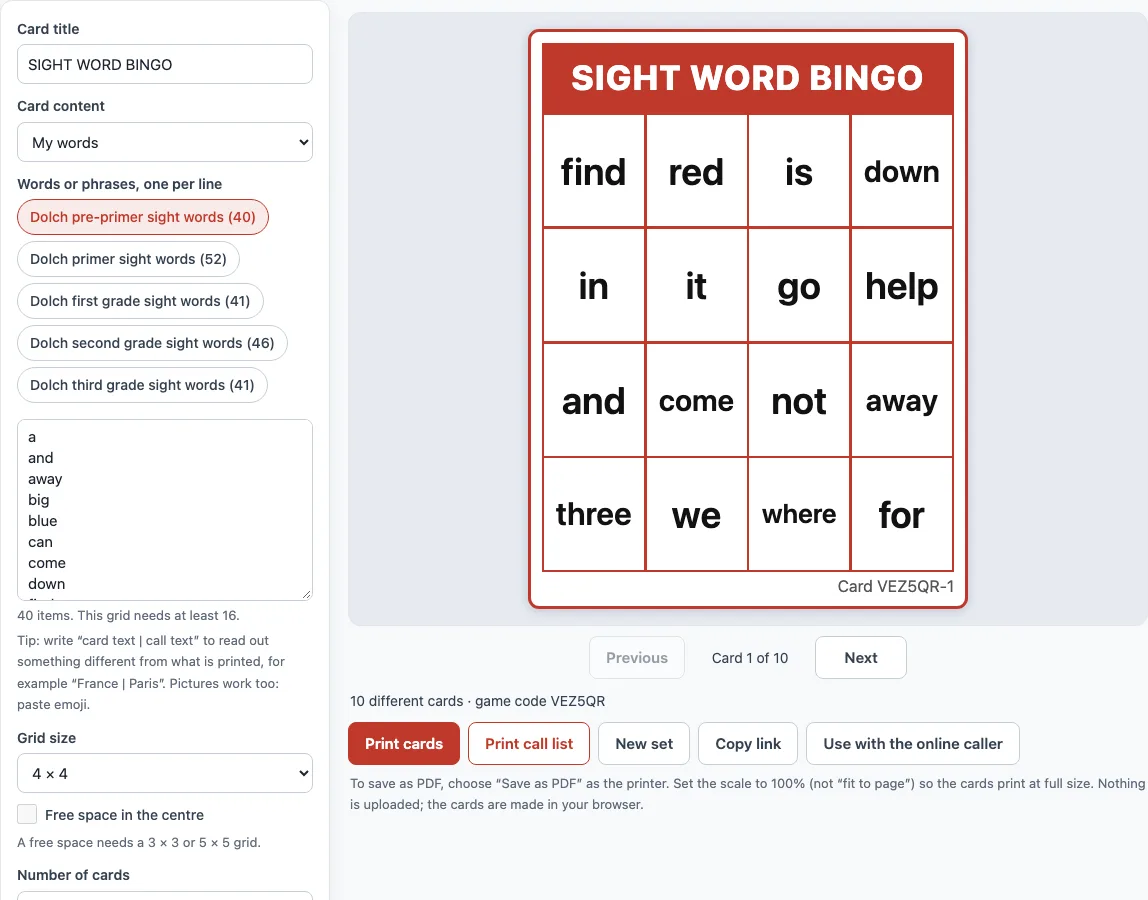
The page opens with the Dolch pre-primer list already loaded, so you can print a set straight away. Preset chips load the other Dolch levels, and you can paste in your own words, one per line. A set can hold up to 500 cards, and no two cards in a set have the same words.
Before you print, you can change the grid size, turn the free centre space on or off, and edit the card title.
How to make sight word bingo cards
- Open the page. The Dolch pre-primer list is already in the My words box. To use another level, click a preset chip: Dolch primer, Dolch first grade, Dolch second grade or Dolch third grade.
- Edit the word list if you want. Delete words you don’t need, or paste in a new list, such as Fry words or your weekly spelling words. Put one word on each line.
- Choose a grid size: 3 × 3, 4 × 4 or 5 × 5. This page starts at 4 × 4. If the list is too short for the grid, the tool tells you how many more items you need.
- Turn on the free centre space if you want one (3 × 3 and 5 × 5 only). Change the card title if you like; it starts as SIGHT WORD BINGO.
- Set the number of cards, from 1 to 500. The default is 10.
- Choose 1, 2 or 4 cards per page, US Letter or A4, and one of six colours.
- Use Previous and Next to check the preview, then click Print cards.
- Click Print call list for a shuffled calling order with tick boxes, plus the full list in order to check a winner.
Click New set to generate new random cards with a new game code. Copy link saves the exact cards and word list in a link. Use with the online caller opens the bingo caller with the same game and list. To save a PDF, choose ‘Save as PDF’ as the printer and set the scale to 100%.
What is sight word bingo?
Sight word bingo is a bingo game built around sight words. These are common words that children are taught to recognize at a glance, so they don’t have to sound them out each time.
Many sight words do not follow regular phonics patterns. Words such as “the” or “said” are hard to decode, so children learn them by sight and through repetition. Searches for this game also appear as “sightword bingo” and “bingo sight words”; they all mean the same thing: a bingo card where the squares are these words. The game gives that practice a purpose: children hear the caller read a word, scan their card to find it, and cover it. Playing several rounds with the same list means they see and hear the same words more than once, without it feeling like a drill.
What are Dolch sight words and which list should I start with?
Dolch sight words are a well-known set of 220 sight words, not counting nouns, compiled by Edward William Dolch in the 1930s. The list is split into five levels: pre-primer (40 words), primer (52), first grade (41), second grade (46) and third grade (41). The nouns list is not included here.
Start with the pre-primer list, which is the first level and the one the page loads by default. Its words include “a”, “and”, “away”, “big”, “blue”, “can”, “come”, “down”, “find”, “funny”, “jump”, “little”, “look”, “make”, “see”, “the”, “yellow”. Once children know those well, move up to the primer list, which has words such as “all”, “are”, “ate”, “black”, “have” and “ran”. The levels are named for the school stages they are commonly used with. First grade words include “after”, “could” and “walk”, and second grade words include “always”, “because” and “would”. Third grade words include “about”, “better” and “together”. If your class has already learned some of these words, delete them from the box so the cards only hold the words you want to practise.
Frequently asked questions
How do you play sight word bingo in class or at home?
One person acts as the caller. They read a word from the call list, and players cover it on their card with a counter, a button or a pen mark. The first player to fill a line calls Bingo, and then reads their words back so the caller can check them.
To practise reading, let the child be the caller. They read each word aloud, which gives them practice too.
Can I use my own sight word list, such as Fry words?
Yes. Delete the words you don’t need, or paste a whole new list into the My words box with one word per line. Fry words or a teacher’s weekly spelling words both work.
Can I make a smaller card for younger children?
Yes. A 3 × 3 card is quicker to play and gives children fewer words to scan. It holds 8 words with a free space or 9 without. You can also print 4 cards per page for smaller cards.
How many different cards can I make from one list?
No two cards in a set have the same words, so a whole class can play with one print run. The pre-primer list (40 words) gives 62,852,101,650 different sets of 16 words for a 4 × 4 card with no free space. The primer list (52 words) gives 10,363,194,502,115 different sets. The words can also be placed in different squares.
Can I use these cards for a paid product or my shop?
Yes. Everything made here is royalty-free for personal, classroom and commercial use, including Etsy printables, Teachers Pay Teachers and KDP books. No credit is needed. The only limit is copying the generator or site to run a competing tool.
Related tools
- Bingo card generator - for word lists that go beyond sight words, or for any other set of items.
- Phonics bingo - when you want a game built around letter sounds rather than whole words.
- Classroom bingo - for whole-class games with a wider range of topics.
- Number bingo - for practising numbers instead of reading.
- Picture bingo - for children who are still building their reading, using pictures.
- Bingo caller - to call your game on screen with the same cards and list.
- Bingo card template - for one card you fill in square by square.