Fitness Bingo Card Generator
Printable exercise bingo for PE class, a gym group or a monthly challenge: workouts, kids' moves or healthy habits, every card different.
Recent
Your last 10 settings, saved only in this browser. Nothing is uploaded.
Fitness bingo is a printable card game in which each square holds an exercise, such as 10 push-ups or a 30-second plank, and players mark squares as they complete them. This free fitness bingo generator makes the cards in your web browser, with no sign-up. Your cards are made on your own device, and nothing is uploaded.
The page opens with an adult exercise list. It also includes chips for kids’ movement games and a healthy habits challenge, and you can type your own exercises instead. Use it for a gym class, a school PE lesson, a family workout or an office team. Each set can hold up to 500 cards, and every card in a set is different, so a whole group can play at once.
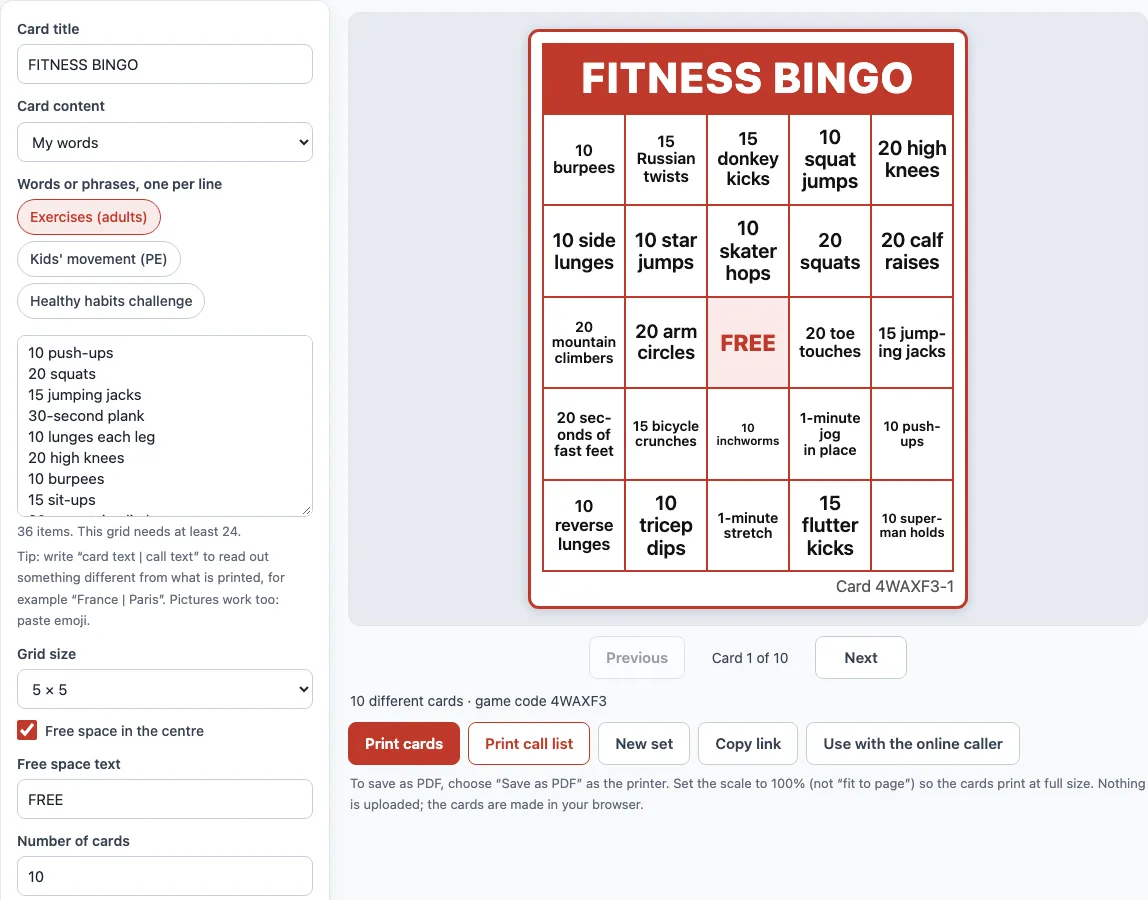
How to make fitness bingo cards
- Pick a list. The page opens with the Exercises (adults) list in the word list box; the preset chips load Kids’ movement (PE) or Healthy habits challenge instead. To write your own, edit the box, one item per line.
- Change the card title if you want something other than FITNESS BINGO.
- Choose a grid size: 3 × 3, 4 × 4 or 5 × 5.
- For 3 × 3 or 5 × 5, keep the FREE centre space or change its text. The 4 × 4 grid has no free space.
- If your list is too short for the grid, the tool tells you how many more items you need. Add them before you continue.
- Set the number of cards, from 1 to 500. The default is 10.
- Choose your print options: 1, 2 or 4 cards per page, US Letter or A4, an optional letters row, an optional card number and one of six colours.
- Step through the preview with Previous and Next.
- Click Print cards for the players, or Print call list for the person calling the squares.
New set creates new random cards with a new game code. Copy link saves the exact cards and word list in a link you can share. Use with the online caller opens the bingo caller with the same game and list. To save a PDF, choose “Save as PDF” as the printer and set the scale to 100%. Emoji work as pictures too: a line such as “🚴 Bike ride” gives a picture square.
How do you play fitness bingo in PE class?
Each student gets a card, and the teacher draws an exercise from the call list. Everyone who has that exercise on their card does it and marks the square, so the whole class moves on every call.
Print the call list first. It shows a shuffled calling order with tick boxes, and the full list in order at the end, which you use to check a winner. Tick off each exercise as you call it. When a student has a full line, ask them to name the squares, then check each one against the ordered list before you declare a winner. Because every card is different, students cannot copy each other’s squares.
Set the number of cards to match your class size, and choose reps that suit your students. For example, you can change 10 push-ups to 5 push-ups by editing that line in My words.
How do I make a fitness bingo challenge for a month?
Make one card for each person, then have each person mark a square every time they complete that exercise over the month. A full line or a full card earns the reward you set. This works well for a group that trains on its own schedule, because nobody needs to be in the same place at the same time.
Start by choosing a list with enough variety for a month, such as the healthy habits list, and choose a grid size that suits your goal. Set the number of cards to the number of people taking part. Print the cards, or use New set to create a fresh batch if someone wants a different starting card. Keep the rewards simple and agree on them before the challenge starts, and set one day each week to compare cards.
Frequently asked questions
Can I change the number of reps?
Yes. Reps and times are plain text, so you can edit any line to suit your group. Change 10 push-ups to 5 push-ups, or 30-second plank to 20-second plank, in the word list box.
Is it suitable for kids?
Yes, use the Kids’ movement (PE) chip, which includes games such as Bear crawl, Crab walk and Frog jumps. You can also edit any move to suit the age and ability of the children playing. Adults supervising children should make sure each move is safe for them.
How many cards can I make at once?
You can make from 1 to 500 cards in one set, and the default is 10. Every card in a set is different.
Can I use the cards commercially?
Yes. Everything made here is royalty-free for personal, classroom and commercial use, including printables sold on Etsy or Teachers Pay Teachers and books published through KDP. No credit is needed. The only limit is copying the generator or site to run a competing tool; see the terms.
Is this medical advice?
No. The page does not give medical advice, and the exercises are listed as a game. If you have a health condition, check with a professional before you start a new exercise routine.
Related tools
- Bingo card generator: Use this for any other topic, with your own word list or numbers.
- Classroom bingo: Use this for lessons, reading or any other school topic.
- Kindness bingo: Use this to set small acts of kindness as squares for a group.
- Family bingo: Use this for games and activities you share at home.
- Office bingo: Use this for team games and workplace activities.
- Bingo caller: Use this to call the numbers or squares for a game.
- Bingo wheel: Use this to pick a random square or prize without a call list.
- Blank bingo cards: Use this when you want to write your own squares by hand.