Back to School Bingo Card Generator
Printable back to school bingo for the first day or week: backpacks and bus rides, picture cards, or a teacher's first-week checklist.
Recent
Your last 10 settings, saved only in this browser. Nothing is uploaded.
Back to school bingo is a printable bingo game for the first day or first week of school. This free generator makes sets of bingo cards in your web browser, with no sign-up, and the cards are made on your device without anything being uploaded.
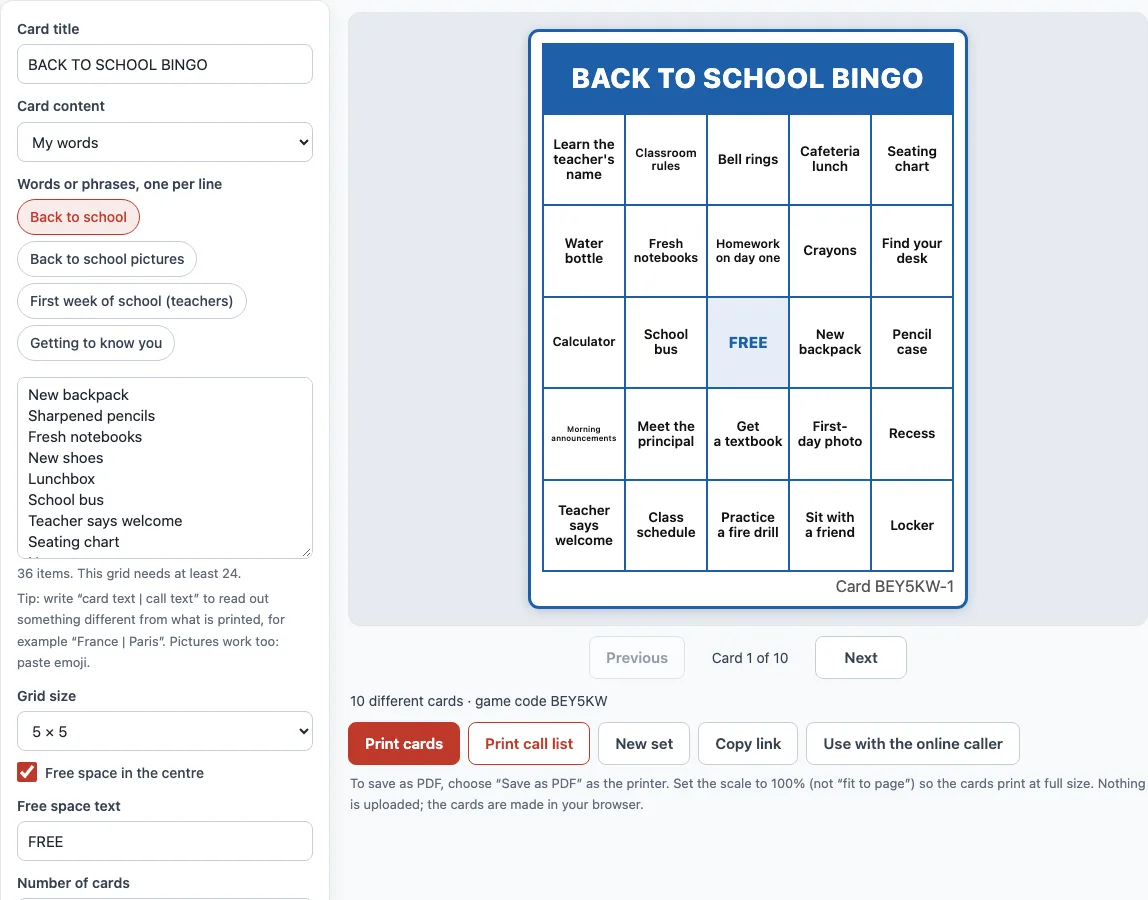
The page starts with the Back to school list of 36 items, such as New backpack, Locker and First-day photo. Three other lists are one click away: Back to school pictures, which uses 30 emoji with a word, First week of school (teachers), and Getting to know you, which has 36 “find a classmate who” traits. You can also type your own list. Choose a 3 × 3, 4 × 4 or 5 × 5 grid, make from 1 to 500 cards per set, and print them as a classroom or first-day game, with no two cards in a set alike.
How to make back to school bingo cards
- Start with the tool at the top of this page. The Back to school list loads first, in My words mode.
- To use another list, click a preset chip: Back to school pictures, First week of school (teachers) or Getting to know you. To use your own items, type them in the word list box, one item per line.
- Choose the grid size: 3 × 3, 4 × 4 or 5 × 5. The 3 × 3 and 5 × 5 grids can have a free centre space, which says FREE by default and can be edited. The 4 × 4 grid has no free space.
- Set the number of cards, from 1 to 500. The default is 10.
- Change the card title (it starts as BACK TO SCHOOL BINGO) and the card colour (it starts as blue). You can also pick 1, 2 or 4 cards per page, US Letter or A4, and add an optional letters row or card number.
- Use Previous and Next to step through the preview.
- Click Print cards for the bingo cards, or Print call list for a shuffled calling order with tick boxes and the full list in order to check a winner.
New set gives you fresh random cards with a new game code. Copy link saves the exact cards and word list in a link you can reuse. Use with the online caller opens the bingo caller with the same game and list. To save a PDF, choose “Save as PDF” as the printer and set the scale to 100%.
How do you play back to school bingo on the first day?
Students mark a square when they spot an item or do something from the card during the first day or week, and the first student with a full line wins. Alternatively, the teacher reads items from the call list, and students mark the matching squares on their cards. The spot-it mode needs no caller. Because squares such as Recess or Locker may not happen on the same day for every class, decide in advance whether the game runs for one day or the whole first week.
Is there a version for teachers’ first week?
Yes. The First week of school (teachers) list has 30 tasks such as Learn all the names, Make a seating chart, Label the cubbies, Go over the class rules and Take a class photo. Teachers can use the card as a checklist and tick off each square as it is done. Every card in a set is different, so a teacher and each helper can have their own.
Can I make picture cards for younger children?
Yes. The Back to school pictures list shows an emoji with its word, such as 🎒 Backpack, ✏️ Pencil or 🚌 School bus. These cards suit children who cannot read yet, because they can spot the picture. A 3 × 3 card has 8 pictures plus a free space. You can also write your own picture items in the form “🌊 Wave”, where emoji work as pictures.
Can I use the get-to-know-you list?
Yes. The Getting to know you list uses traits such as Has a pet dog, Plays an instrument, Speaks two languages and Likes to draw. Students must talk to each other to find a classmate who matches a square. The cards have no space to write a name, so students can note names on their own paper or say the name aloud when they mark a square.
Frequently asked questions
Are these cards free to use for paid products?
Yes. Everything made here is royalty-free for personal, classroom and commercial use, including Etsy printables, Teachers Pay Teachers and KDP books, and no credit is needed. The only limit is copying the generator or site to run a competing tool.
Do I need an account to make cards?
No. The generator is free and needs no sign-up. The cards are made on your device, and nothing is uploaded, so you can use it on a school computer without installing anything.
How many different cards can I make?
Every card in a set is different. On a 5 × 5 card with a free space, the 36-item Back to school list can make 1,251,677,700 different sets of 24 squares, and each of the 30-item lists can make 593,775.
Can I save the cards as a PDF?
Yes. Click Print cards, choose “Save as PDF” as the printer and set the scale to 100%.
What if my list is too short for the grid?
The tool tells you how many more items are needed for the grid you chose. Add items in the word list box, one per line, or switch to a smaller grid. A 3 × 3 card with a free space needs only 8 items.
Related tools
- Bingo card generator for making bingo cards from any word list, numbers or blank cards.
- Classroom bingo for games built around classroom topics and routines.
- Human bingo for students who move around the room to find people who match each square.
- Phonics bingo for practising letter sounds and early reading skills.
- Picture bingo for picture-based cards when you want less text on the squares.
- Number bingo for practising numbers, counting and maths facts.
- Reading bingo for tracking books or reading goals over a term.
- Bingo caller for calling the game online with the same cards and word list.