Alphabet Bingo Card Generator
Printable ABC bingo for preschool and kindergarten: capitals, lowercase, letter matching or beginning sounds, every card different.
Recent
Your last 10 settings, saved only in this browser. Nothing is uploaded.
Alphabet bingo is a letter game where players cover letters on a card as the caller names them, and this free generator makes printable alphabet bingo cards in your web browser. It needs no sign-up, and the cards are made on your own device, so nothing is uploaded. ABC bingo and letter bingo are the same game: children find and cover letters, and the first player with a full row, column or diagonal wins.
The page opens with capital letters A to Z. You can switch to lowercase letters, letter matching or beginning sounds with one click. Each set can hold from 1 to 500 cards, and every card in a set is different, so one game works for a small group or a whole classroom. You can print the cards, print a shuffled call list, or save the same game as a link to use again.
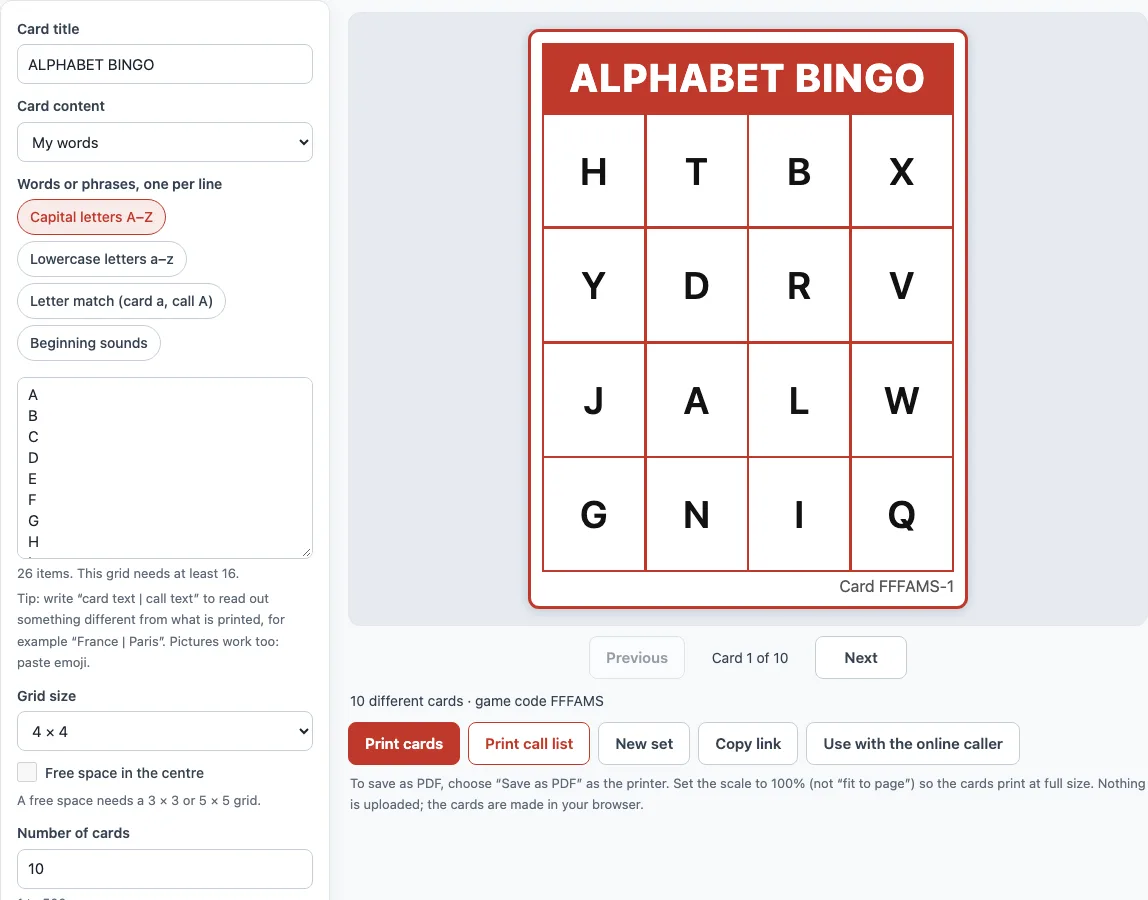
How to make alphabet bingo cards
- Open the page. It starts in My words mode with the Capital letters A–Z list loaded. For lowercase letters, letter matching or beginning sounds, click the matching preset chip.
- Look at the word list box. It holds one item per line, so you can add, remove or edit letters there.
- Choose a grid size: 3 × 3, 4 × 4 or 5 × 5. This page starts on 4 × 4 without a free space, because a 5 × 5 card holds 24 of the 26 letters and games end almost at once. The 3 × 3 and 5 × 5 grids can have a free centre space, which shows FREE by default. You can edit that text. If your list is too short for the grid, the tool tells you how many more items you need.
- Set the number of cards, from 1 to 500. The default is 10.
- Set the print options: cards per page (1, 2 or 4), US Letter or A4, the card title, the optional letters row, the optional card number, and one of six colours.
- Use Previous and Next to step through the preview.
- Click Print cards to print the cards. Click Print call list to get a shuffled calling order with tick boxes, plus the full list in order to check a winner.
- If you want new cards, click New set. For a saved version of your cards and word list, click Copy link. Use with the online caller opens the bingo caller with the same game and list.
To save a PDF, choose ‘Save as PDF’ as the printer and set the scale to 100%.
How do you play alphabet bingo with preschoolers?
Give each child a card and some counters or daubers, then call one letter at a time. A child covers the letter on the card if they have it, and the first child with a full row, column or diagonal calls out bingo. Keep the game short and simple for young children, and stop as soon as someone calls bingo.
The caller can say the letter or show it. The online caller can display the letter on a screen, which helps children who recognise shapes faster than sounds. If you use the beginning-sounds set, say the sound or the picture word, such as “apple”, and children find the letter a. Use the printed call list to keep the order of calls, and read the full list in order to check the winner’s card. Every letter that was called should be covered on that card.
Should I use capital or lowercase letters?
Start with capital letters, which is the default on this page, and move to lowercase once children can name the capitals. Capital letters are easier to tell apart than lowercase ones, where pairs such as b and d or p and q look alike, so they make a gentle first game.
Once children know both forms, use the letter matching set. Each card shows a lowercase letter, such as a, and the call list shows the capital, A. Children have to match the two forms to win, which builds the link between them. Use the lowercase set on its own when children have learned the capitals and are ready for small letters.
Use the beginning-sounds set when the goal is sound awareness. The card shows the letter, and the call list reads a picture word. The set has 25 letters, and x is not included.
Frequently asked questions
What grid size is best for young children?
With all 26 letters, a 5 × 5 card with a free space shows only 24 of them, so the cards are nearly full and games end quickly. For preschool and kindergarten, a 4 × 4 card (16 letters) or a 3 × 3 card (8 letters plus the free space) gives longer, more varied games.
Can I make picture or sound alphabet bingo?
Yes. Write each line as card text | call text. For example, a | apple prints the letter a on the card and puts “apple” on the call list. Emoji also work as pictures, so a line such as 🍎 Apple gives a picture square with a word under it.
Is alphabet bingo free to print and use commercially?
Yes. Everything made with this tool is royalty-free for personal, classroom and commercial use, including Etsy printables, Teachers Pay Teachers and KDP books. No credit is needed. The only limit is copying the generator or site to run a competing tool; see the terms.
How do I save alphabet bingo cards as a PDF?
Click Print cards, choose ‘Save as PDF’ as the printer, and set the scale to 100%. Then save the file to your device.
What happens if my word list is too short for the grid?
The tool tells you how many more items you need for the grid you chose. Add more letters or words to the list box, or switch to a smaller grid.
How do I make large letters for a young child?
Set the cards per page to 1. The cards use the same layout as the other word cards, so one card per page prints the largest letters.
Related tools
- Bingo card generator - the main generator for any word list, with the same print and sharing options.
- Phonics bingo - use when you want to practise letter sounds rather than letter names.
- Picture bingo - use when children should match pictures instead of letters or words.
- Classroom bingo - use for whole-class games with classroom words and pictures.
- Number bingo - use when children are learning to recognise numbers.
- Spanish bingo - use for vocabulary games in Spanish.
- Bingo caller - use to call numbers or letters on a screen during a game.
- Bingo dauber printables - use for printable dot-marker sheets for young children.