Bingo Card Generator (Bingo Maker)
Type your words or pick numbers, choose the grid, and print up to 500 different bingo cards with a call list.
Recent
Your last 10 settings, saved only in this browser. Nothing is uploaded.
New and updated tools
- Secret Santa Generator: Draw Names Without EmailPaste the names, add who must not draw whom, and get one private link per person to send yourself. Or print fold-over slips. Nothing is stored or emailed.
- Bridal Shower Bingo Card GeneratorPrintable bridal shower bingo for gift opening or the party itself: gift words, shower moments or pictures, every card different.
- Summer Bingo Card GeneratorPrintable summer bingo for a pool party, camp or the holidays: ice cream and sprinklers, picture cards, or a bucket list to tick off.
- Self Care Bingo Card GeneratorPrintable self care bingo as a weekly challenge: small acts of self-care, coping skills or workplace wellbeing, every card different.
- Back to School Bingo Card GeneratorPrintable back to school bingo for the first day or week: backpacks and bus rides, picture cards, or a teacher's first-week checklist.
- Fitness Bingo Card GeneratorPrintable exercise bingo for PE class, a gym group or a monthly challenge: workouts, kids' moves or healthy habits, every card different.
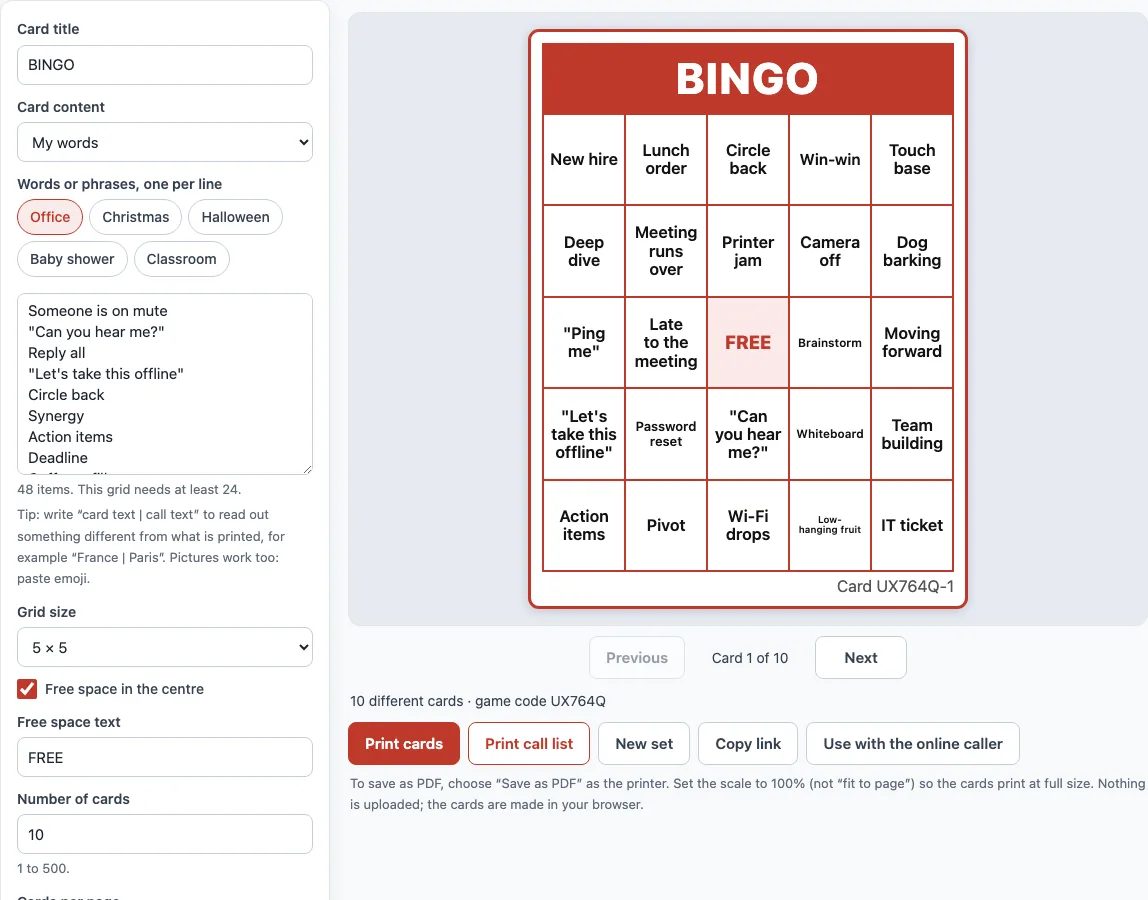
How to use the Bingo Card Generator
- Choose what goes on the squares: Numbers 1–75, Numbers 1–90, My words, or Blank.
- If you chose My words, type or paste your items into the word list box, one per line. Or click a preset (Office, Christmas, Halloween, Baby shower or Classroom) to fill the list, then edit it.
- Pick the grid size: 3 × 3, 4 × 4 or 5 × 5.
- Switch the free space on or off. It is available on 3 × 3 and 5 × 5 grids. Change its text if you like; the default is FREE.
- Set the number of cards, from 1 to 500. The default is 10.
- Check the preview, and use Previous and Next to look through the cards one at a time.
- Choose your print options: 1, 2 or 4 cards per page, US Letter or A4, a card title, an optional letters row, an optional card number, and one of six colours.
- Click Print cards. Then click Print call list to get a shuffled calling order with tick boxes, plus the full list in order so you can check a winner.
New set makes new random cards with a new game code. Copy link reopens exactly the same cards, including your word list, so you can share it or come back to it later. Use with the online caller opens the bingo caller page with the same game.
How does a word bingo game work?
Every player gets a different card. The caller reads items from the call list in random order, and players mark any matching square on their card. The first player to complete the agreed pattern, such as a full line, calls Bingo. The caller then checks that card against the items already called. Agree on the winning pattern before the first call so there is no argument at the end.
How to make custom bingo cards
Choose My words, then fill the word list box with one item per line. Each line becomes one square, so keep items short enough to read at a glance. Use one theme for a single game, such as holiday words or classroom vocabulary, so players recognise every item. Start from a preset if you like, then delete lines you don’t want and add your own. For cards with pictures instead of words, use picture bingo.
How to create custom bingo cards with separate card and call text
Write ‘card text | call text’ on one line. The left part prints on the card, and the right part goes on the call list. For example, ‘Paris | France’ puts Paris on the card and France on the call list. This suits matching pairs, such as a country and its capital. Lines without a bar use the same text for both. Emoji work as pictures, so a single emoji can be a square.
How many words do you need for a bingo card?
Each grid needs a set number of different items: 24 for a 5 × 5 card with a free space (25 without), 16 for a 4 × 4 card, and 8 for a 3 × 3 card with a free space (9 without). A 4 × 4 grid has no centre square, so it never has a free space. If your list is too short, the tool says how many more items it needs. Add a few extra items so you don’t end up one short after editing.
How do I make sure every bingo card is different?
The tool builds every card in a set so that no two cards have the same set of squares. You can make 1 to 500 cards per set. A longer list gives more possible combinations. If your list is too short for the number of cards you ask for, the tool tells you how many different cards are possible. With exactly 24 items on a 5 × 5 card with a free space, only one different card is possible, so you need more items for a real set. For scale, 48 items on a 5 × 5 card with a free space give 32,247,603,683,100 different sets of 24 squares, so a set of 500 cards never repeats.
Can I print bingo cards as a PDF?
Yes. Set your paper size, cards per page and other print options in the tool first. Then click Print cards and choose ‘Save as PDF’ as the printer in the print dialog. Set the scale to 100%, not ‘fit to page’, so the cards print at full size and match the preview.
Frequently asked questions
Is this bingo card generator free?
Yes. It needs no sign-up, and nothing you enter is uploaded. The cards are made on your device.
Can I use numbers instead of words?
Yes. Choose Numbers 1–75 or Numbers 1–90 for classic number bingo. Choose Blank if you want empty squares to fill in by hand.
Can I change the free space text?
Yes. The centre square on 3 × 3 and 5 × 5 grids starts as FREE, and you can change it. A 4 × 4 grid has no free space.
How do I keep the same cards for later?
Click Copy link. The link reopens exactly the same cards, including your word list.
Can I run the game with an online caller?
Yes. Click Use with the online caller to open the bingo caller page with the same game.
Can I add a card number to each card?
Yes. Turn on the option to show a card number made from the game code and the card’s position, such as K7Q2MX-1.
How many cards can I print on one page?
Choose 1, 2 or 4 cards per page. One card per page gives the largest squares, which helps young children and players with poor eyesight; four per page saves paper for a big group.
Can I sell the bingo cards I make with this generator, for example on Etsy or in a KDP book?
Yes. Everything you make here is royalty-free for personal, classroom and commercial use, including Etsy printables, Amazon KDP books, Teachers Pay Teachers and print-on-demand products. You do not need to give credit. The only limit is that you may not copy this generator or site to run a competing tool; see the terms.
Related tools
In season now: Halloween bingo for October 31, then Thanksgiving bingo and Christmas bingo.
- Printable bingo cards (1–75): classic number cards ready to print.
- Blank bingo cards: empty cards to fill in by hand.
- Picture bingo: cards made from your own photos.
- Christmas bingo: festive words and pictures.
- Bingo caller: call numbers or words on screen.
- Bingo patterns: winning shapes such as lines, corners or an X.
- Virtual bingo: players join from different places.
- Bingo call sheets: a printed sheet to tick off calls.
- Bingo card template: type into the squares of one card.